Community transport software that knows your drivers got home.
Homeby runs the bookings, the diary and the drivers for a volunteer car scheme. It also keeps watch over each volunteer from the moment they set off until they say they're home safe, and makes sure somebody hears about it if they don't.
Every screen on this page is the real software, running in a demonstration copy. Every person, address and phone number in it is invented.
Honestly, where things stand
A working system, still being built.
Built and working
Bookings, the diary, matching drivers to journeys, the driver's phone, the safety layer, passenger records, mileage claims and funder reports. 838 automated checks, all passing on the current version.
Not there yet
Text-message alerts aren't connected yet; alerts go by email for now. There's no price, no contract and no scheme using it for real yet.
What we need
Conversations with people who run community transport, about how you keep volunteer drivers safe today and what gets in the way.
Driver safety
Booking the journey is half the job. The other half is the driver.
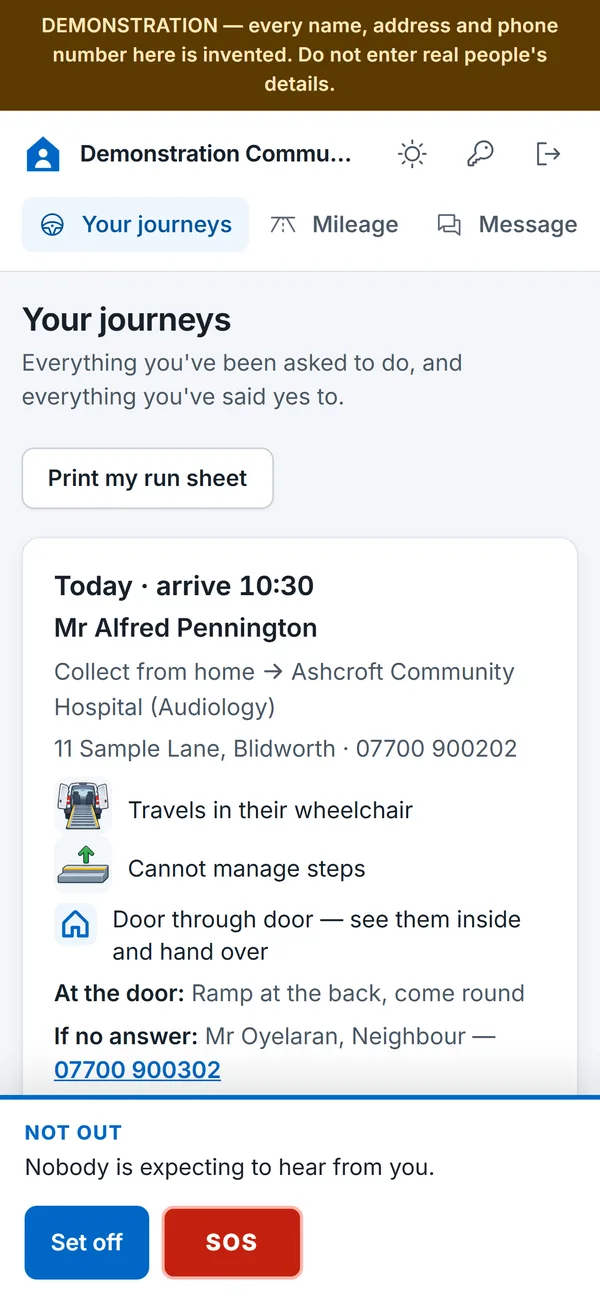
A volunteer driver is often alone, with a passenger they may not know, on roads with no signal. Homeby follows the volunteer, not just the booking: set off, check in, home safe. If something goes wrong, the office knows straight away. If nobody in the office answers, Homeby asks the next person on the list.
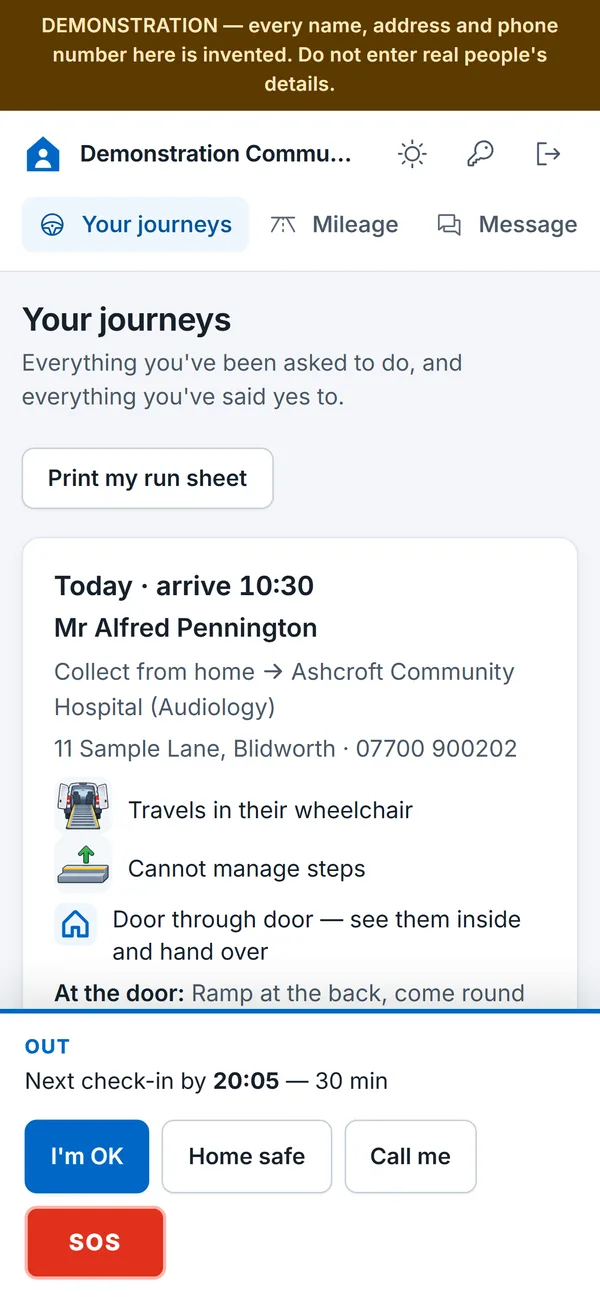
Set off, check in, home safe
The driver's duty runs from setting off to getting home, not just from pick-up to drop-off. Check-ins come due on a timer. A missed one turns overdue by itself, and the office is told without anyone having to remember to chase.
SOS, even with no signal
With no signal, the alarm is saved on the phone and sent the moment a connection comes back. The record shows the time it was actually pressed and marks that it arrived late.
A silent alarm
For when the danger is in the car. The driver's screen stays as it was, and the alert tells the office not to ring them.
"Call me"
A quiet way for a driver to ask the office to ring them, without raising an alarm. It goes to the first person on the list only.
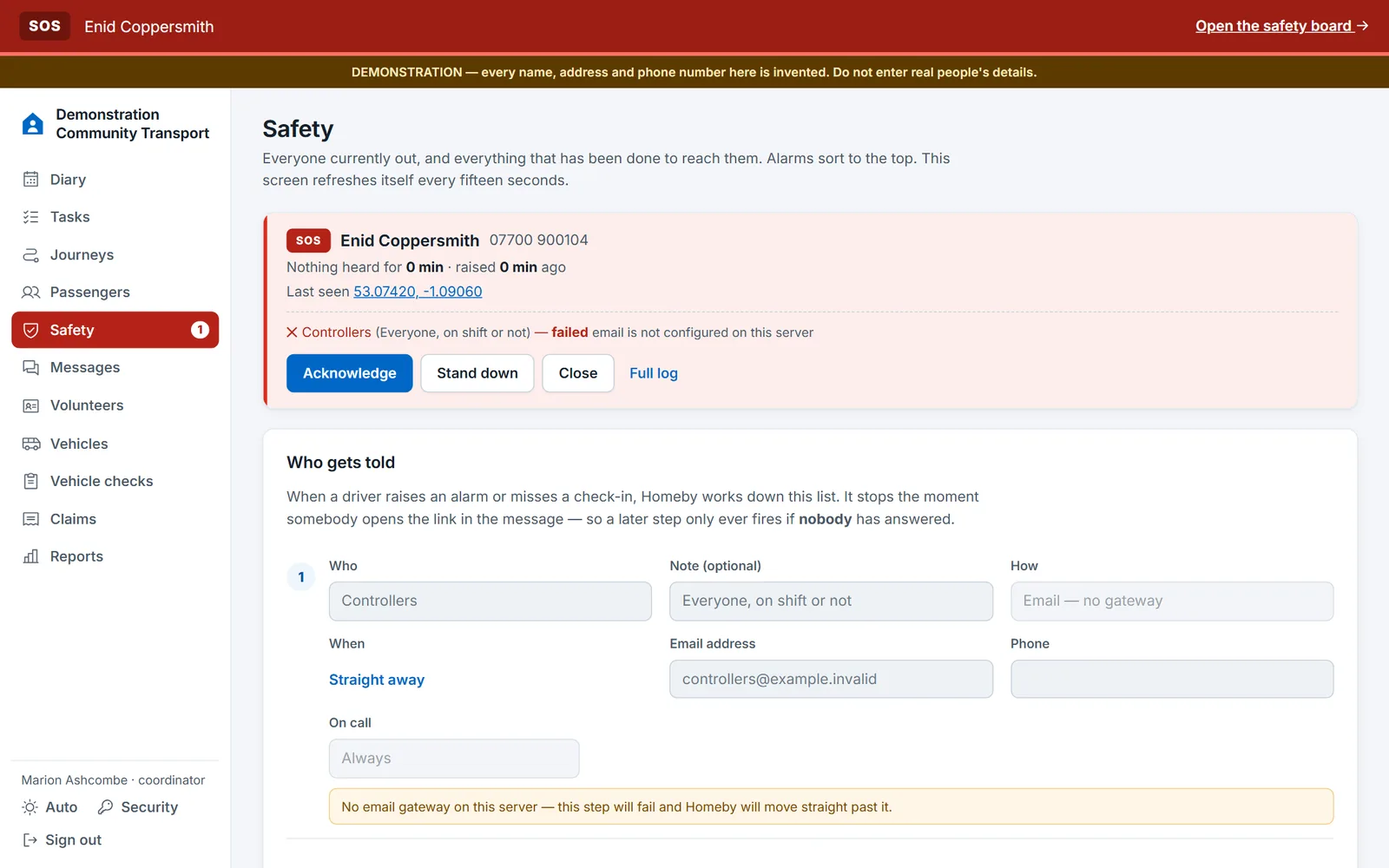
The office can't miss it
Any screen, any page: a red banner, a flashing browser tab and a repeating alarm sound until somebody acknowledges it.
A list of real people
You choose who is told, and in what order. Every 30 seconds Homeby moves down the list until somebody answers, skipping anyone who is off call. If the list runs out, it says so plainly.
It never assumes a message arrived
An alert counts as received only when the person opens the link inside it. If nobody does, Homeby treats it as failed and moves on to the next person.
A record nobody can edit
Every alarm, check-in and message sent is kept in a log the database itself refuses to change or delete. It downloads with both times: when it happened and when it was received.
Location when it matters, not all day
The phone records where the driver is, and how much battery they have left, when they set off, check in or raise an alarm. It doesn't track them in between.
What the safety layer can't do yet
- Alerts go by email for now. Sending by text message is written but not yet connected to a text provider. Phone calls aren't built.
- Drivers use Homeby in their phone's web browser, not an app from an app store. It needs to be open for check-ins to be pressed and for a saved alarm to send. It doesn't buzz to remind them a check-in is due.
- On iPhones, the silent alarm can't vibrate to confirm it was raised; Apple doesn't let web pages do that. And if a silent alarm is raised with no signal, the phone currently shows that it's waiting to send. That's being fixed.
Running the day
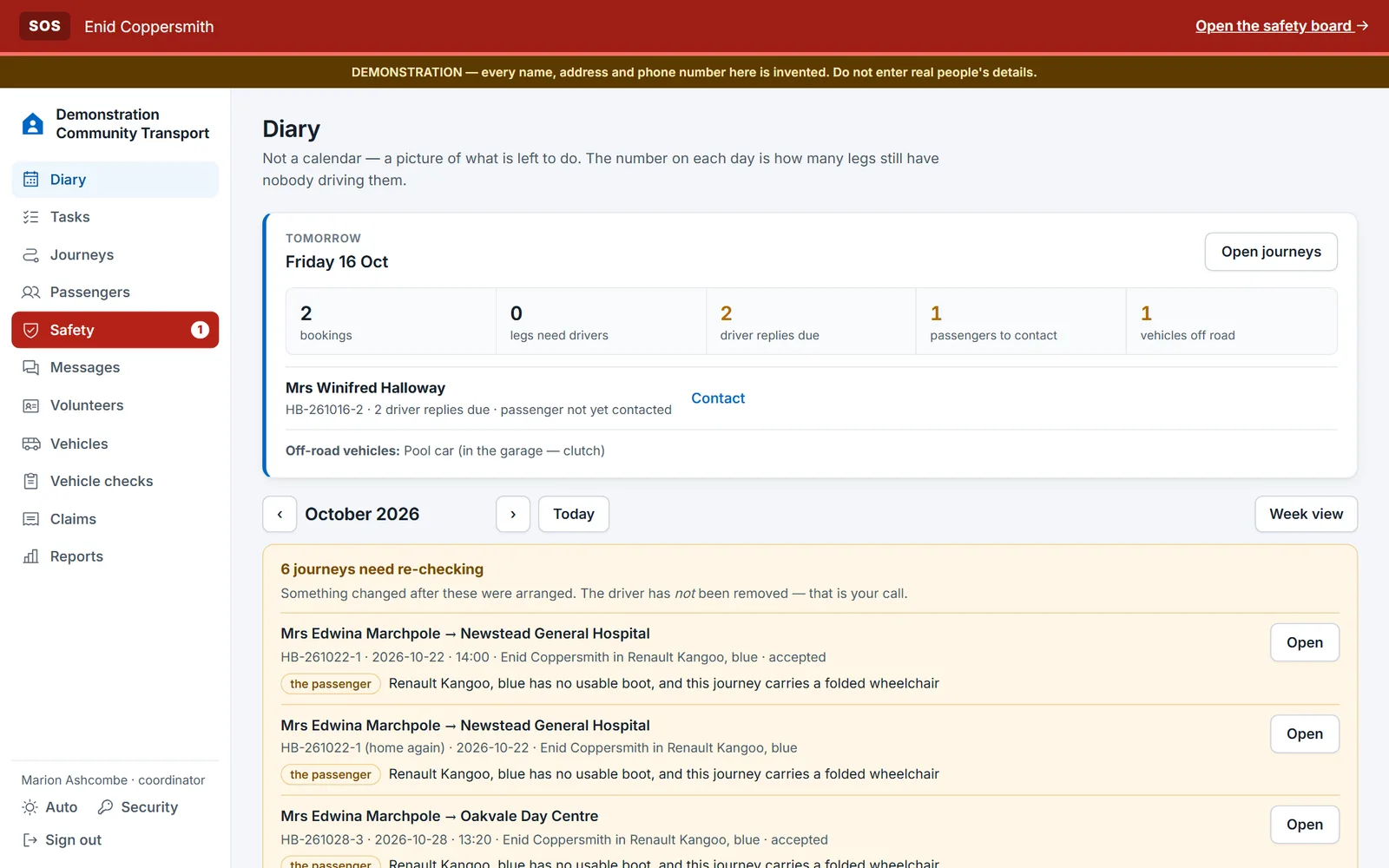
A diary that shows what's left to do.
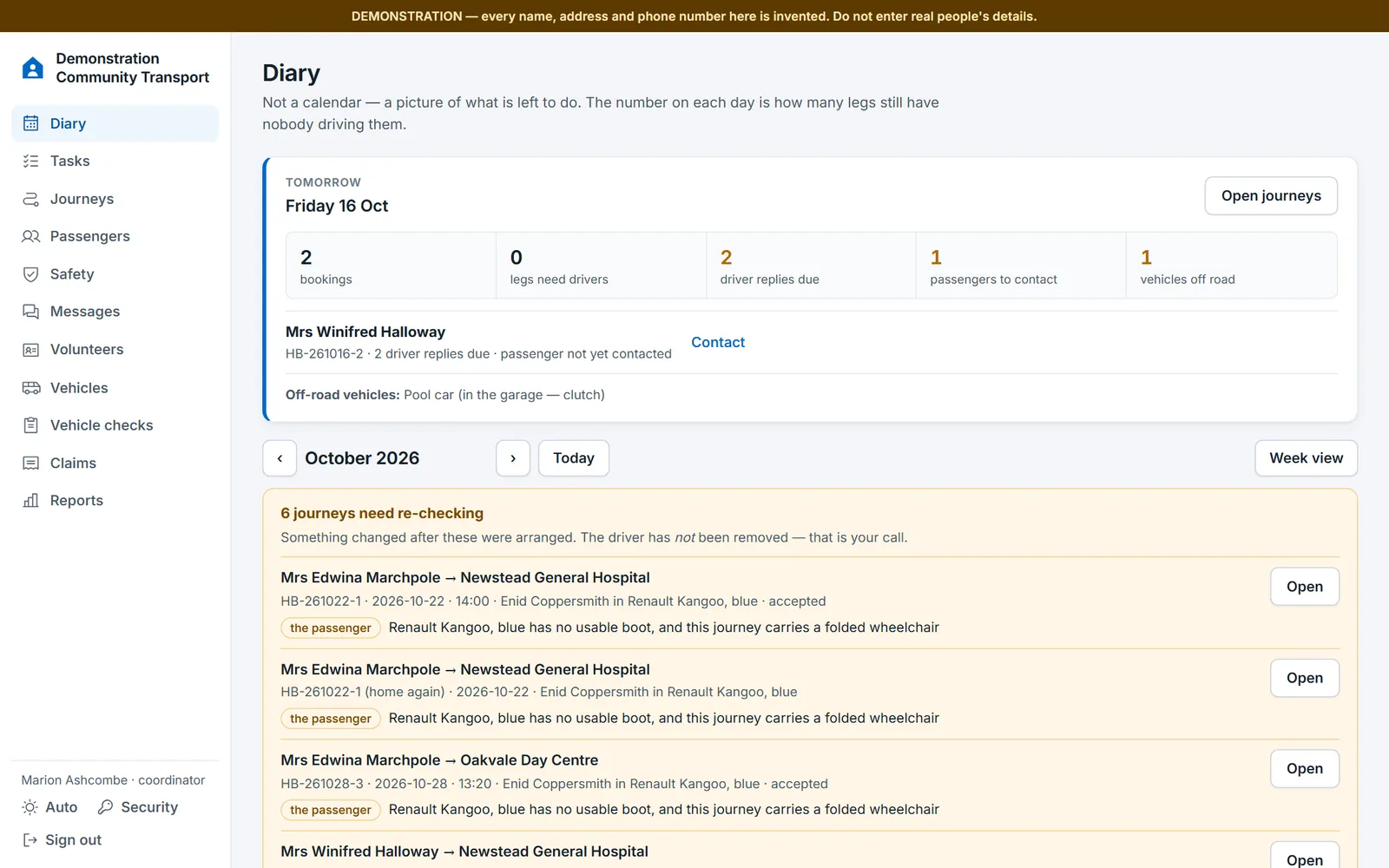
Not just a calendar. Each day shows how many journeys still have nobody driving them, and tomorrow's summary sits on top: bookings, driver replies still due, passengers to contact and vehicles off the road.
Matching that checks the paperwork
Drivers are matched on availability, vehicle and passenger needs. Their licence, DBS and insurance are checked against the date of the journey, not just today. A driver who can't be used still shows, with the reason why.
Offer, accept, decline
Offer a journey to a driver. They accept, or decline with a reason, and a declined journey comes straight back to the office. Drivers see new offers when they next open Homeby.
Repeat journeys
Weekly dialysis or a fortnightly clinic: set the pattern once, every 1 to 8 weeks. Changing it later? Choose just this one, this one and later, or all of them.
Changes don't slip through
If the date, time or destination changes, the driver's confirmation is cleared and the journey is offered again. If two coordinators edit the same booking, the second save is stopped and shown what changed.
One list of things to do
Alarms, cancellation requests, journeys without a driver, reminders that failed, fares owed, claims to approve and paperwork about to expire, all in one task list.
Run sheets and vehicles
A printable sheet for each driver, also saved on their phone for areas with no signal. Vehicle MOT, tax, insurance and service dates, garage days that block bookings, and walk-round checks with defect reports.
Passengers
Everything a driver needs before they knock.
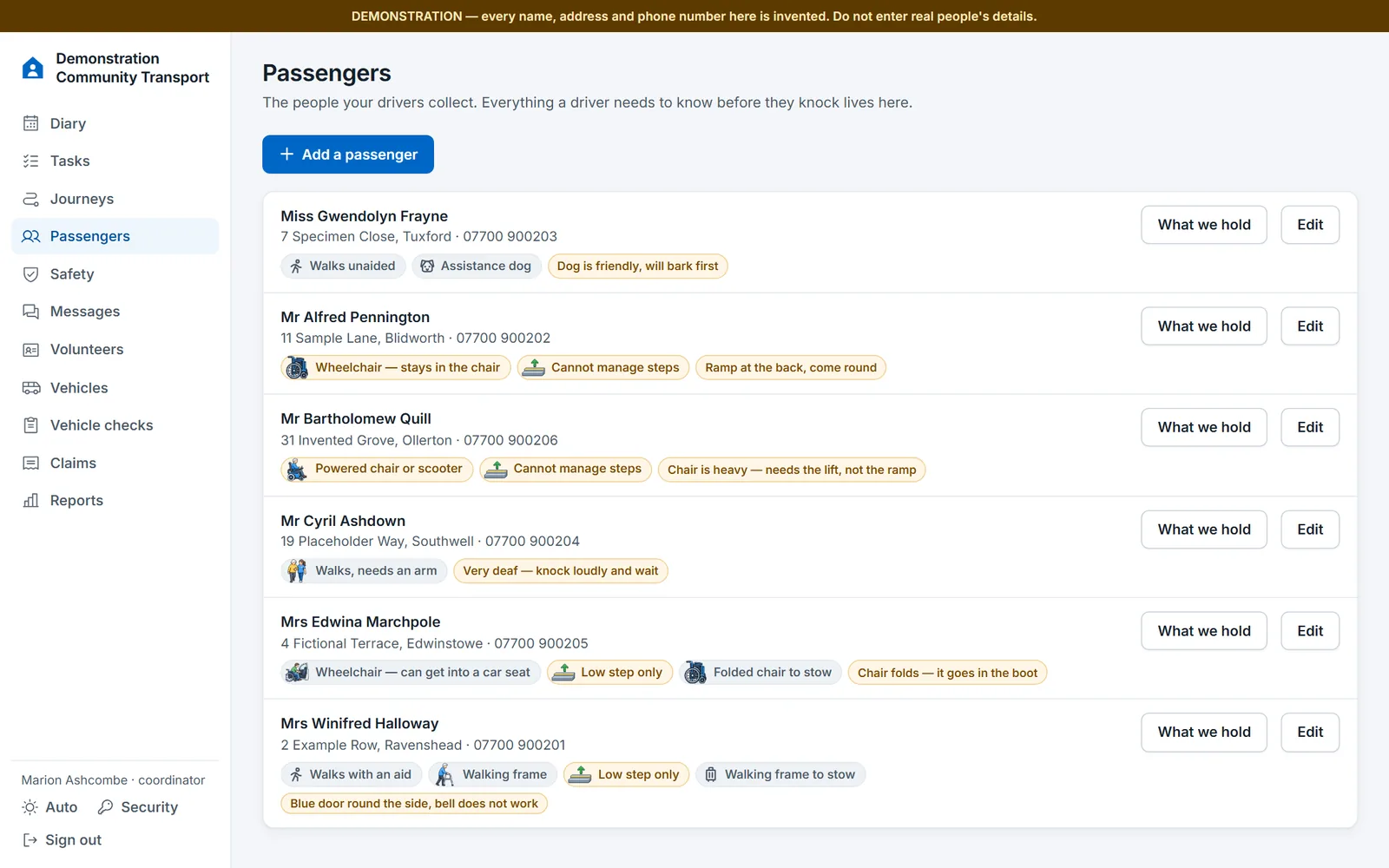
Needs are recorded in plain words and pictures, such as "wheelchair, stays in the chair" or "powered chair, needs a tail lift, not a ramp", and checked against the vehicle before a journey is offered.
Practical, not medical
Drivers see what they need to do, like "cannot manage steps" or "ramp at the back". They never see a passenger's health details.
A page of their own
Passengers can have a private link showing their journey: the driver's first name once it's arranged, an "I'll be ready" button, and a way to ask to cancel.
Reminders the day before
By email, for passengers who want them. If one can't be sent, it becomes a "ring them instead" task rather than disappearing.
Driver and passenger pairings
The office can record that a driver doesn't take a particular passenger, with a reason. Homeby then won't allow the booking, and the driver never sees it.
Fares and payments
What each passenger was asked to pay, what has come in, part-payments and refunds, and a list of what is still owed. This is record-keeping, not invoicing.
Quick rebooking
"Same again" and saved trips for the journeys people make every week.
Records, reports and money
The numbers funders ask for, without the evening with a spreadsheet.
Reports, sliced any way
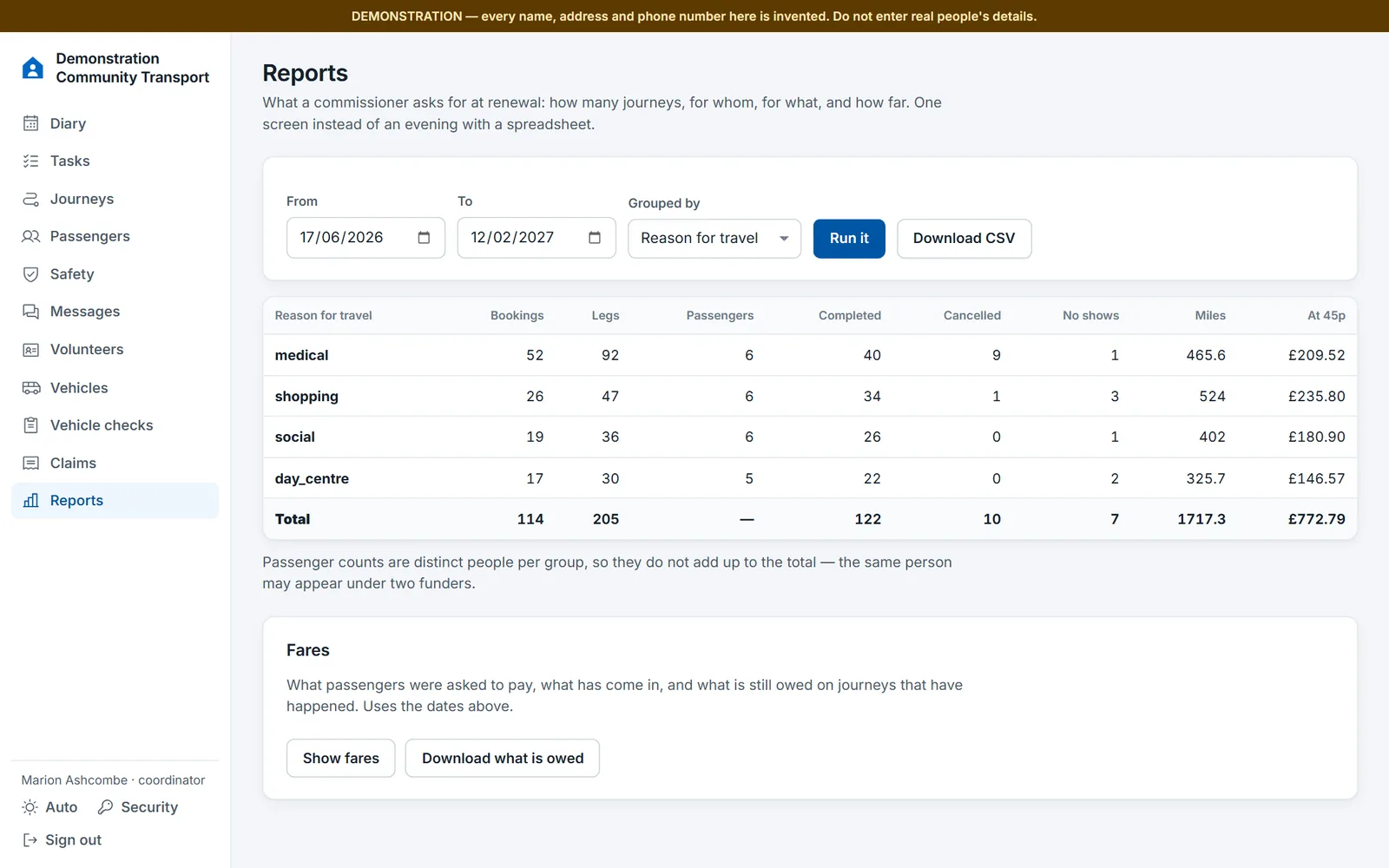
By funder, payer, reason, driver, destination, month, area, age or ethnic group, with completed, cancelled and no-show journeys counted separately. Download any of it as a spreadsheet.
Safe to send to a funder
In reports about people, any group of fewer than 5 passengers is hidden so nobody can be singled out. Each scheme sets its own limit. Exact figures are available inside the scheme, and every look at them is logged.
Mileage at HMRC rates
45p a mile for each driver's first 10,000 miles in the tax year, then 25p, worked out automatically and kept on each claim. Drivers can see how much they have left at 45p. Claims go from submitted, to approved or rejected with a reason, to paid.
Paperwork dates, watched
DBS, licence and insurance for drivers; MOT, tax, insurance and service for vehicles. Anything due in the next 30 days appears on the office task list, and anything out of date stops that driver or vehicle being booked.
Nothing quietly disappears
Cancelled journeys stay in the record, struck through. Volunteers who leave are switched off, not deleted, and their outstanding journeys go back to the office.
Bring your records with you
Import from a spreadsheet: everything is checked first and nothing is written until it all passes. Exports open in a spreadsheet without risk of running anything hidden in a cell.
Security and personal data
Built for the kind of records a scheme holds.
A community transport scheme holds names, addresses and mobility needs for people who are often vulnerable. Homeby is built on the assumption that this will be looked at closely.
Each role sees its own share
Administrator, coordinator and driver each see what their role needs. Everything is locked by default and opened only on purpose.
Two-step sign-in
A code from any authenticator app, with single-use recovery codes. A scheme can make it compulsory for its administrators.
Safer sign-in
Volunteers are invited by email to choose their own password. Repeated wrong guesses lock out that device or connection for a while.
Schemes kept apart
Every record belongs to one scheme, and the software keeps each scheme's records out of every other scheme's view. This is checked by automated tests.
"What do you hold about me?"
One click shows everything held about a passenger. Erasure removes the person and every note about them but keeps the journey counts, so reports stay true. A two-year review asks a person to decide; nothing is deleted automatically.
Backups
A copy is taken every night and the last 14 are kept, plus a "back up now" button. They aren't yet copied anywhere off the server, and Homeby says so on screen.
Where we are
What isn't built or decided yet.
Better you read it here than find it out later.
Not built yet
- Text-message and phone-call alerts. Alerts go by email today. Texts are written but not connected to a provider.
- Any journey type except community car. Dial-a-ride, dial-a-bus, group hire and bus routes are not built.
- A record of journeys you had to turn down, for evidencing unmet need.
- Emailed reminders when paperwork is about to expire. The warnings appear on screen only.
- An app from the app stores. Drivers use Homeby in their phone's web browser.
- Invoicing. Fares are recorded, but no invoices or statements are produced.
Not decided yet
- Price. The intention is one flat price per scheme, never a charge per volunteer. There is no price yet.
- Terms and a data processing agreement. Both will exist before any scheme puts a real passenger's details in.
- Where it's hosted, and where backups are copied to.
- Real-world use. No scheme is using Homeby yet. It runs as a demonstration with invented people only.
Get in touch
Run a community transport scheme? We'd like to hear how you do it.
Not a sales call; there's nothing to buy yet. We want to know how you organise drivers and keep them safe today, and what gets in the way. If you'd like to look around the demonstration copy, ask and we'll send you a login.